
Check mark symbols are the ticks ✓ ✔ and the ticked box ☑ used to say yes, done or correct, with cross marks ✗ ✘ ☒ for no. The green ✅ is a separate emoji, while ✓ and ✔ are plain text that keep your font colour. Every one here copies with a single tap.
Tick marks (text)
Cross marks (text)
Checkboxes
Circles and marks
Check mark emoji
Checklist lines
Progress rows
Tap any tick, cross or box to copy it — 68 in this tray. Last checked: 12 October 2026 (names and code points against Unicode 17.0). We have not yet checked each one on real devices; see where they show further down.
Tick marks with your words
Type a task, a name or a word and see it with a tick, a box or a cross; tap one to copy it into a list, a caption or a group chat.
Check mark emoji: ✅ ✔️ ☑️
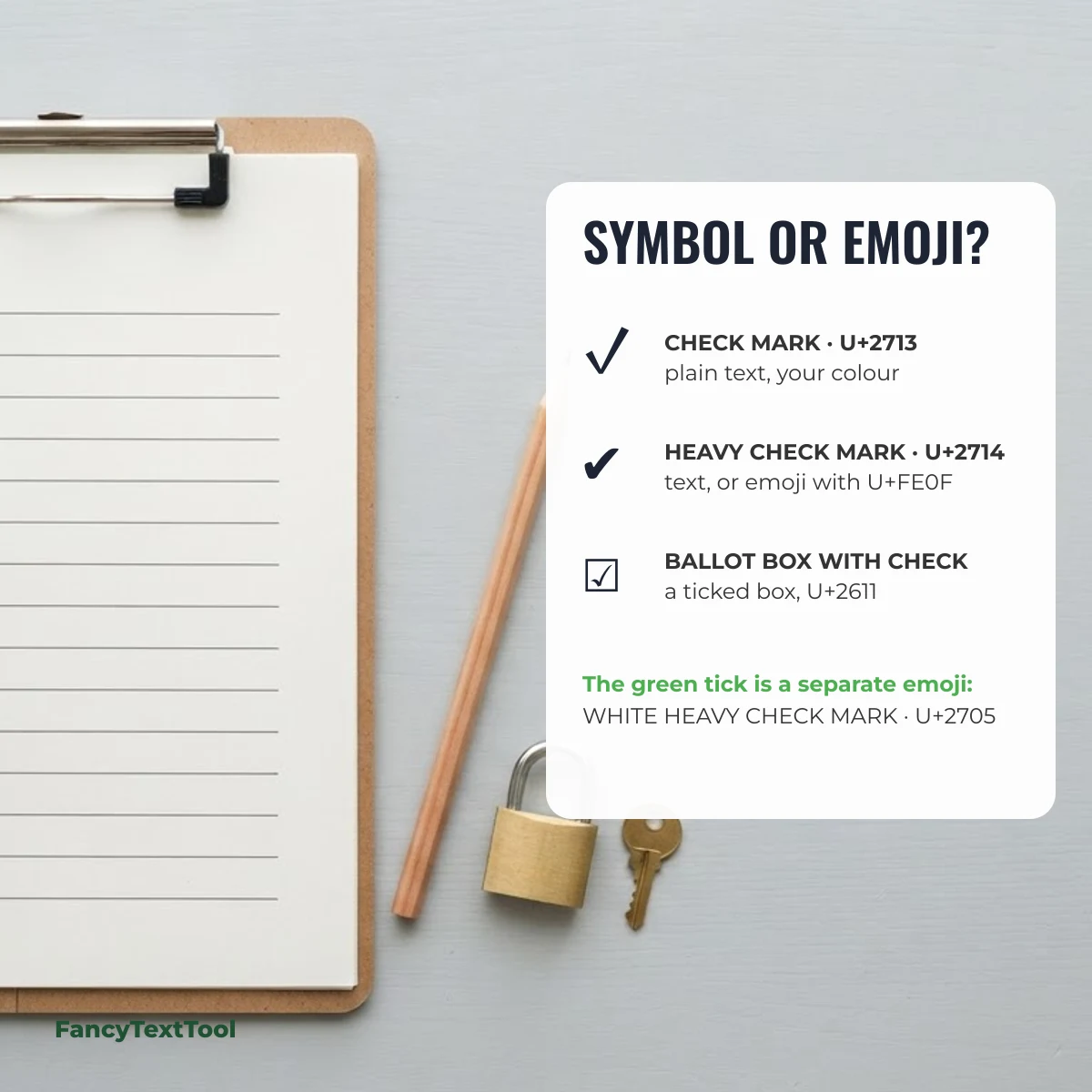
There are three tick emoji and they are easy to mix up. ✅ is WHITE HEAVY CHECK MARK (U+2705): its Unicode name says “white”, but every emoji set draws it as a green square with a white tick. ✔️ is HEAVY CHECK MARK (U+2714) plus the emoji selector, usually a plain dark tick. ☑️ is BALLOT BOX WITH CHECK (U+2611), a ticked box that some sets colour blue or grey.
| Symbol | Unicode name | Code point | HTML entity | Added in |
|---|---|---|---|---|
| ✅ | White Heavy Check Mark (always an emoji) | U+2705 | ✅ | Unicode 6.0 |
| ✔️ | Heavy Check Mark (emoji form) | U+2714 U+FE0F | ✔️ | Unicode 3.2 |
| ✔ | Heavy Check Mark (text form) | U+2714 | ✔ | Unicode 1.1 |
| ☑️ | Ballot Box With Check (emoji form) | U+2611 U+FE0F | ☑️ | Unicode 3.2 |
| ☑ | Ballot Box With Check (text form) | U+2611 | ☑ | Unicode 1.1 |
| ✓ | Check Mark (text only) | U+2713 | ✓ | Unicode 1.1 |
| ❌ | Cross Mark (emoji) | U+274C | ❌ | Unicode 6.0 |
| ❎ | Negative Squared Cross Mark (emoji) | U+274E | ❎ | Unicode 6.0 |
In a message, ✅ means done, approved or “yes, that’s right”; ✔ reads the same but quieter. ❌ and ✖️ mean no, wrong or cancelled.
Find a check mark by shape
Need a thin tick for a document, a bold one for a button or a box for a form? Pick by shape:
| Shape | Pick | Code point | Name |
|---|---|---|---|
| Thin tick | U+2713 | CHECK MARK | |
| Bold tick | U+2714 | HEAVY CHECK MARK | |
| Light tick | U+1F5F8 | LIGHT CHECK MARK | |
| Tick in a box | U+2611 | BALLOT BOX WITH CHECK | |
| Bold tick in a box | U+1F5F9 | BALLOT BOX WITH BOLD CHECK | |
| Empty box | U+2610 | BALLOT BOX | |
| Thin cross | U+2717 | BALLOT X | |
| Bold cross | U+2718 | HEAVY BALLOT X | |
| Cross in a box | U+2612 | BALLOT BOX WITH X | |
| Multiplication x | U+2715 | MULTIPLICATION X | |
| Square root (keyboard tick) | U+221A | SQUARE ROOT |
Check mark alt codes and shortcuts
There is no classic Windows Alt code for ✓, but there are reliable ways to type one:
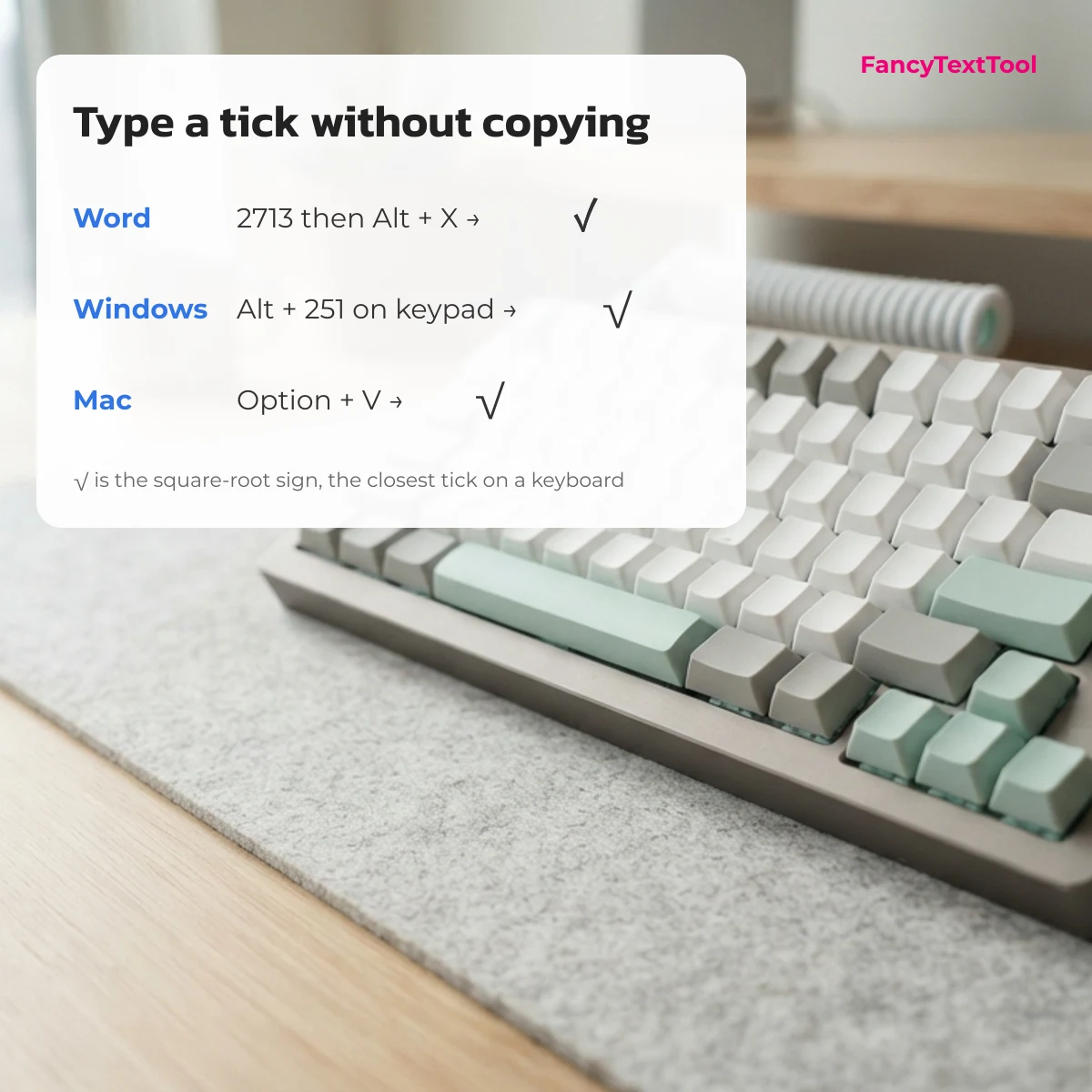
- Microsoft Word: type
2713then press Alt + X for ✓, or2714then Alt + X for ✔.2611gives ☑ and2612gives ☒. - Windows (any app): Alt + 251 on the number pad types √, the square-root sign that most people accept as a tick. The emoji panel (Windows key + full stop) has ✅ and ✔️ under “check”.
- Mac: Option + V types √; Control + Command + Space opens Character Viewer, where searching “check” finds ✓ and ✔.
- HTML:
✓for ✓,✔for ✔ and✅for ✅.
How to copy a check mark on a phone
Tap the tick in the tray above, then press and hold where you want it and choose Paste. The emoji versions are also on the phone’s emoji keyboard: search “check” for ✅ ✔️ ☑️. The text-only ticks ✓ and ☐ are not on any phone keyboard, so copying is the only way.
Check marks that work everywhere
✓ ✔ ✗ ✘ ☐ ☑ ☒ have been in Unicode since version 1.1 (1993), so almost every device and app can show them. The newer light and bold variants added in Unicode 7.0 (2014), such as 🗸 and 🗹, are the ones most likely to appear as an empty box on older phones and PCs — stick to the classic set for forms and documents others will open.
Suggest a check mark
Missing a tick or a box style? Send it through the contact form under “Suggest a symbol”; approved symbols are added with the date.
Questions
What is the ✅ emoji called?
Its official Unicode name is WHITE HEAVY CHECK MARK (U+2705). Emoji keyboards usually call it “check mark button”.
What does ✅ mean in a text?
Done, confirmed or agreed — for example “tickets ✅” means the tickets are sorted. It is a positive, finished signal.
What does ✔ mean?
✔ is HEAVY CHECK MARK (U+2714) and means the same as a written tick: yes, correct or completed. As text it takes your font colour; with the emoji selector it becomes ✔️.
Ticks belong to the symbol library on FancyTextTool; the emoji collection has the colour versions next to every other emoji.